Voice AI Platform
Voice AI Platform
Voice AI Platform
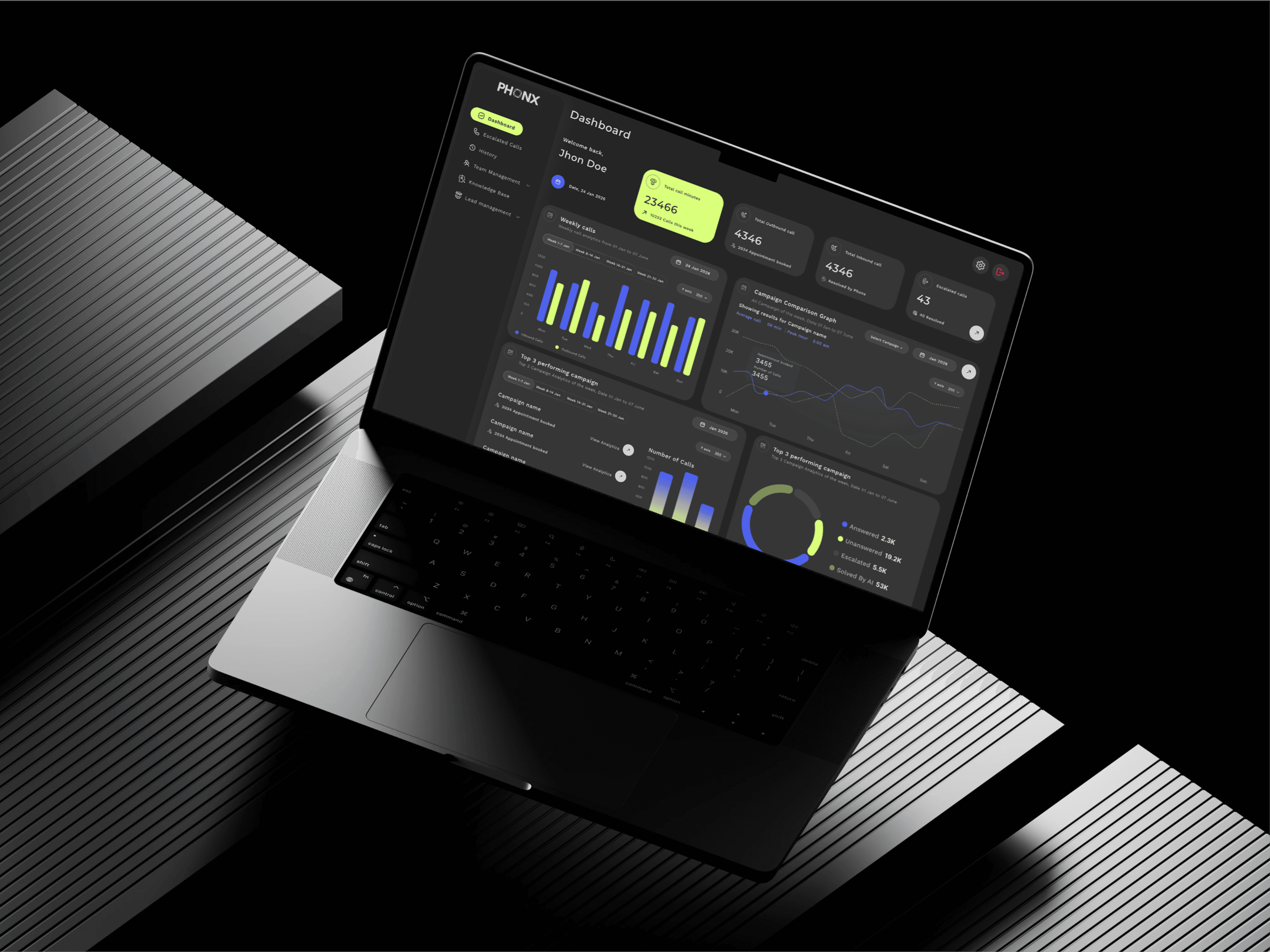
Scaling an inbound Voice AI MVP into a broader platform
How we evolved an inbound MVP into a system supporting inbound operations, outbound campaigns and the workflows around them.
Screens have been anonymised per NDA. The constraints, decisions, and outcomes are true to the live product.
Focus — Product Architecture · IA · System Design · UX Flows · Interaction Design Stage — MVP → Product · In development
Focus — Product Architecture · IA · System Design · UX Flows · Interaction Design Stage — MVP → Product · In development
Focus — Product Architecture · IA · System Design · UX Flows · Interaction Design Stage — MVP → Product · In development
6
6
Interconnected modules designed from scratch
Interconnected modules designed from scratch
40 min
40 min
Maximum call length handled end-to-end
Maximum call length handled end-to-end
0→1
0→1
Platform built with no prior reference
Platform built with no prior reference
Product Context
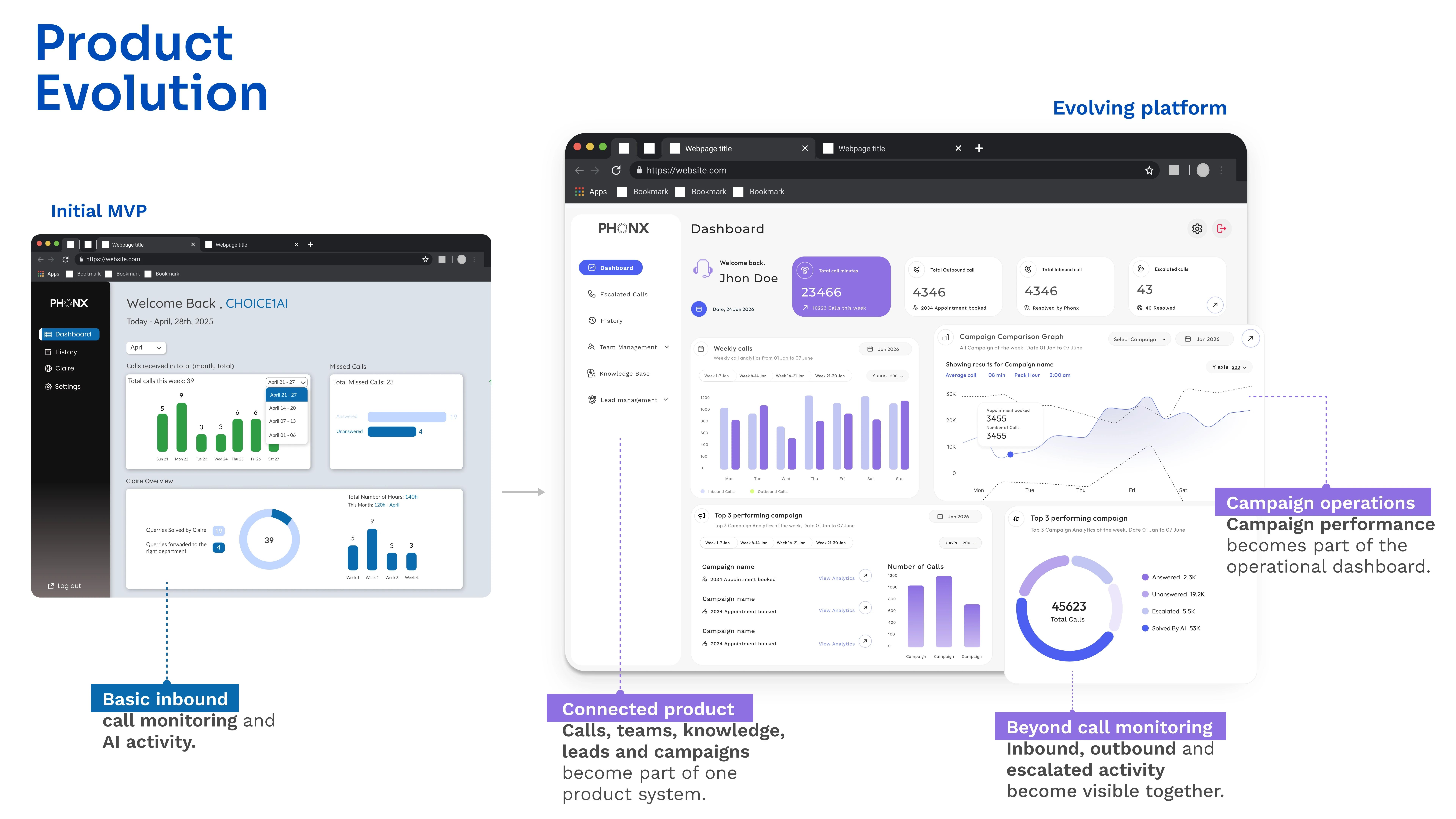
Phonx AI started as an inbound calling MVP built to validate the product with investors and then we scaled.
Once the MVP was delivered, we began expanding the product beyond inbound calling.
The first version covered call history, team management, knowledge base and lead management.
The challenge became bigger than adding new features. We needed to rethink how inbound, outbound, AI configuration, campaigns, conversations, leads and analytics could work together as one product.
I work with another designer across this transition, from product architecture and user flows to interaction design and key product surfaces.
Once the MVP was delivered, we began expanding the product beyond inbound calling.
The first version covered call history, team management, knowledge base and lead management.
The challenge became bigger than adding new features. We needed to rethink how inbound, outbound, AI configuration, campaigns, conversations, leads and analytics could work together as one product.
I work with another designer across this transition, from product architecture and user flows to interaction design and key product surfaces.
Product Context
Phonx AI started as an inbound calling MVP built to validate the product with investors and then we scaled.
WHERE WE STARTED
An inbound MVP with the core building blocks
The first version focused on inbound calling and gave users the foundations needed to operate it:
Call History · Teams · Knowledge Base · Leads maganement. The MVP gave us something concrete to build from. The next phase was about understanding what the product needed to become, rather than simply adding more screens.
THE PRODUCT WAS GETTING BIGGER
Outbound introduced a different way of working as Inbound and outbound calling have different operational needs.
We therefore had to design a system that could support different workflows without creating disconnected products.
This became the foundation for the product we are continuing to build.
Configure → Test → Launch → Monitor
OUTBOUND
Campaign Builder
Audience Segmentation
Calling Schedules
DNC (Do Not Call)
Campaign Operations
Respond → Resolve → Escalate → Review
INBOUND
Knowledge base
Live escalation
Missed calls
Conversation history
THE PRODUCT ARCHITECTURE
We mapped what belongs to the platform and what belongs to each workflow INBOUND OUTBOUND and features that is SHARED in both, Rather than designing every feature independently, This is how we are continuing to build this Product Right Now. So that we do not to think of each feature we have already build and we can scale the product easily.
How It Works
→ ENGAGE (Reach out or receive customer interaction) → UNDERSTAND (Voice AI understands intent and context) → ACT (Take action, provide info, or route to human) → RECORD (Log conversation, outcome and context ) → IMPROVE (Analyze, learn and optimize)
OUTBOUND OPERATIONS
Run and manage outbound campaigns
Campaign Builder - Define goal, audience & script
Audience Management - Filters, segments, exclusions
AI Goal & Guardrails - Intent, rules, constraints
Call Behavior - Timing, retries, voicemails, etc.
Test & Launch - Simulate, test, then go live
Live Campaign Ops - Monitor, intervene, optimize
SHARED CORE
Shared data and operational capabilities
Call History & Recordings - Search, playback, transcripts
Leads / Customers - Unified customer & lead view
Teams & Roles - Users, permissions, assignments
Analytics & Reporting - Insights across inbound & outbound
Compliance & Consent - Audit logs, consent, policies
Integrations - CRM, telephony, calendars, etc.
INBOUND OPERATIONS
Handle incoming customer interactions
AI Voice Agent - Handle incoming calls
Knowledge Base - AI answers using approved content
Live Escalation - Seamless handoff to human
Missed Call Handling - Capture intent and follow up
Conversation Summary - AI summary & disposition
DESIGNING OUTBOUND
We mapped the operator's journey around the decisions they needed to make:
01 Audience
Who should be contacted?
02 AI Goal
What should the AI accomplish?
03 Knowledge
What information can it use?
04 Guardrails
What should it never do?
05 Call Behaviour
When should it call, retry, transfer or stop?
06 Test
Does it behave correctly before launch?
Outbound changed the product from handling individual conversations to orchestrating conversations at scale.
AUDIENCE → AI GOAL → KNOWLEDGE → GUARDRAILS → BEHAVIOUR → TEST → LAUNCH
Designing the outbound campaign experience
Creating an outbound campaign involves decisions around the audience, AI behaviour, policy, campaign parameters and launch. I structured these decisions into a progressive, step-by-step workflow so operators could configure the campaign without facing the full complexity at once. What the reviewer should understand
Campaign Home isn't just a list. It gives the operator enough information to: scan → understand status → decide what to do next and for Setting up the campaign I used Progressive discloure so that I can turn a complex campaign setup into a guided workflow.


WHAT I'M LEARNING
THE WORK DOESN'T END AT LAUNCH We are designing the operational loop as well.
A campaign isn't successful simply because it launched. Operators need to understand what is happening and intervene when the AI behaves unexpectedly. The workflow becomes:
Launch → Monitor → Investigate → Improve
Example: Transfer rate increases
→ Review conversations
→ Identify the issue
→ Update knowledge or configuration
→ Republish
→ Continue operating
This is why we are treating the product as an operational system, not just a configuration tool.
THE WORK DOESN'T END AT LAUNCH We are designing the operational loop as well.
A campaign isn't successful simply because it launched. Operators need to understand what is happening and intervene when the AI behaves unexpectedly. The workflow becomes:
TURNING THE SYSTEM INTO PRODUCT, We are currently translating this architecture into the major product surfaces:
Dashboard — what needs attention?
Call History — what happened?
Campaign Builder — what should the AI do?
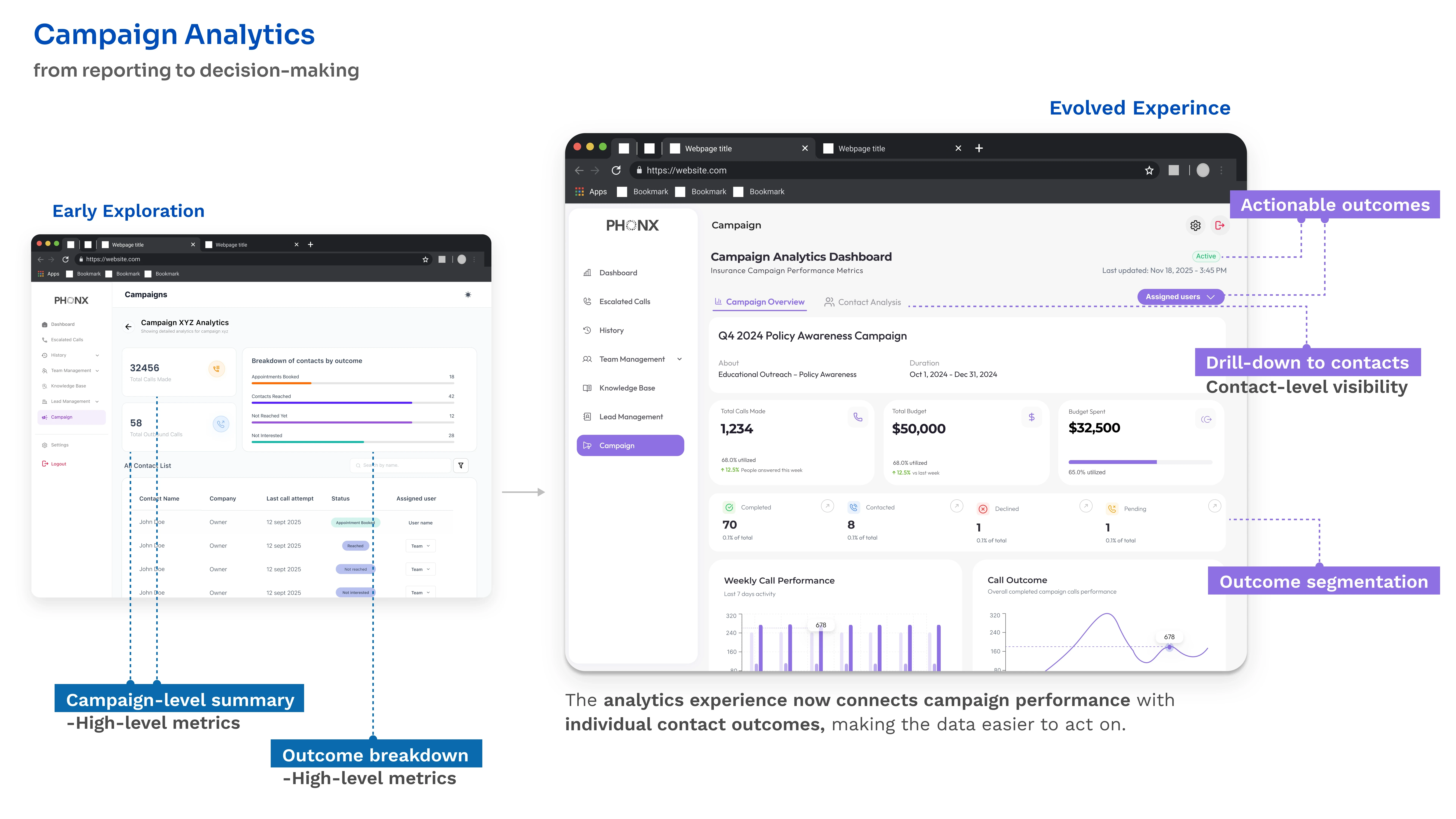
Campaign Analytics — how is the operation performing?
Lead / Customer Management — who is involved?
These screens are being designed as parts of the same system rather than independent features.
TURNING THE SYSTEM INTO PRODUCT, We are currently translating this architecture into the major product surfaces:
Dashboard — what needs attention?
Call History — what happened?
Campaign Builder — what should the AI do?
Campaign Analytics — how is the operation performing?
Lead / Customer Management — who is involved?
These screens are being designed as parts of the same system rather than independent features.
WHERE THE PRODUCT IS TODAY The product has moved beyond the original MVP.
We now have the foundation for a broader Voice AI platform covering:
Inbound + Outbound
AI + Knowledge
Campaigns + Audiences
Conversations + Call History
Analytics + Operations
Leads + Customers
The product is still actively being built, so this is not a final “before and after” story. It is a case study of how I am helping shape the product as it moves from validated MVP → scalable platform.
MY ROLE
I work with another designer across the product transition. My work spans:
Product Architecture
Mapping relationships between shared and workflow-specific capabilities.
Information Architecture
Structuring the product as new capabilities are introduced.
User Flows
Mapping inbound, outbound and operational journeys.
Interaction Design
Defining how users configure, operate and monitor the system.
Product Design
Designing key surfaces across campaigns, calls, analytics, dashboards and lead/customer management.
Cross-functional collaboration
Working with product and engineering as the system evolves.
Once the MVP was delivered, we began expanding the product beyond inbound calling.
The first version covered call history, team management, knowledge base and lead management.
The challenge became bigger than adding new features. We needed to rethink how inbound, outbound, AI configuration, campaigns, conversations, leads and analytics could work together as one product.
I work with another designer across this transition, from product architecture and user flows to interaction design and key product surfaces.
Product Context
Phonx AI started as an inbound calling MVP built to validate the product with investors and then we scaled.
WHERE WE STARTED
An inbound MVP with the core building blocks
The first version focused on inbound calling and gave users the foundations needed to operate it:
Call History · Teams · Knowledge Base · Leads maganement. The MVP gave us something concrete to build from. The next phase was about understanding what the product needed to become, rather than simply adding more screens.
WHERE WE STARTED
An inbound MVP with the core building blocks
The first version focused on inbound calling and gave users the foundations needed to operate it:
Call History · Teams · Knowledge Base · Leads maganement. The MVP gave us something concrete to build from. The next phase was about understanding what the product needed to become, rather than simply adding more screens.
THE PRODUCT WAS GETTING BIGGER
Outbound introduced a different way of working as Inbound and outbound calling have different operational needs.
We therefore had to design a system that could support different workflows without creating disconnected products.
This became the foundation for the product we are continuing to build.
Configure → Test → Launch → Monitor
OUTBOUND
Campaign Builder
Audience Segmentation
Calling Schedules
DNC (Do Not Call)
Campaign Operations
Respond → Resolve → Escalate → Review
INBOUND
Knowledge base
Live escalation
Missed calls
Conversation history
THE PRODUCT ARCHITECTURE
We mapped what belongs to the platform and what belongs to each workflow INBOUND OUTBOUND and features that is SHARED in both, Rather than designing every feature independently, This is how we are continuing to build this Product Right Now. So that we do not to think of each feature we have already build and we can scale the product easily.
How It Works
→ ENGAGE (Reach out or receive customer interaction) → UNDERSTAND (Voice AI understands intent and context) → ACT (Take action, provide info, or route to human) → RECORD (Log conversation, outcome and context ) → IMPROVE (Analyze, learn and optimize)
OUTBOUND OPERATIONS
Run and manage outbound campaigns
Campaign Builder - Define goal, audience & script
Audience Management - Filters, segments, exclusions
AI Goal & Guardrails - Intent, rules, constraints
Call Behavior - Timing, retries, voicemails, etc.
Test & Launch - Simulate, test, then go live
Live Campaign Ops - Monitor, intervene, optimize
SHARED CORE
Shared data and operational capabilities
Call History & Recordings - Search, playback, transcripts
Leads / Customers - Unified customer & lead view
Teams & Roles - Users, permissions, assignments
Analytics & Reporting - Insights across inbound & outbound
Compliance & Consent - Audit logs, consent, policies
Integrations - CRM, telephony, calendars, etc.
INBOUND OPERATIONS
Handle incoming customer interactions
AI Voice Agent - Handle incoming calls
Knowledge Base - AI answers using approved content
Live Escalation - Seamless handoff to human
Missed Call Handling - Capture intent and follow up
Conversation Summary - AI summary & disposition
DESIGNING OUTBOUND
We mapped the operator's journey around the decisions they needed to make:
01 Audience
Who should be contacted?
02 AI Goal
What should the AI accomplish?
03 Knowledge
What information can it use?
04 Guardrails
What should it never do?
05 Call Behaviour
When should it call, retry, transfer or stop?
06 Test
Does it behave correctly before launch?
We mapped the operator's journey around the decisions they needed to make:
01 Audience
Who should be contacted?
02 AI Goal
What should the AI accomplish?
03 Knowledge
What information can it use?
04 Guardrails
What should it never do?
05 Call Behaviour
When should it call, retry, transfer or stop?
06 Test
Does it behave correctly before launch?
Outbound changed the product from handling individual conversations to orchestrating conversations at scale.
AUDIENCE → AI GOAL → KNOWLEDGE → GUARDRAILS → BEHAVIOUR → TEST → LAUNCH
Outbound changed the product from handling individual conversations to orchestrating conversations at scale.
AUDIENCE → AI GOAL → KNOWLEDGE → GUARDRAILS → BEHAVIOUR → TEST → LAUNCH
Designing the outbound campaign experience
Creating an outbound campaign involves decisions around the audience, AI behaviour, policy, campaign parameters and launch. I structured these decisions into a progressive, step-by-step workflow so operators could configure the campaign without facing the full complexity at once. What the reviewer should understand
Campaign Home isn't just a list. It gives the operator enough information to: scan → understand status → decide what to do next and for Setting up the campaign I used Progressive discloure so that I can turn a complex campaign setup into a guided workflow.
Launch → Monitor → Investigate → Improve
Example: Transfer rate increases
→ Review conversations
→ Identify the issue
→ Update knowledge or configuration
→ Republish
→ Continue operating
This is why we are treating the product as an operational system, not just a configuration tool.
THE WORK DOESN'T END AT LAUNCH We are designing the operational loop as well.
A campaign isn't successful simply because it launched. Operators need to understand what is happening and intervene when the AI behaves unexpectedly. The workflow becomes:
TURNING THE SYSTEM INTO PRODUCT, We are currently translating this architecture into the major product surfaces:
Dashboard — what needs attention?
Call History — what happened?
Campaign Builder — what should the AI do?
Campaign Analytics — how is the operation performing?
Lead / Customer Management — who is involved?
These screens are being designed as parts of the same system rather than independent features.
WHERE THE PRODUCT IS TODAY The product has moved beyond the original MVP.
We now have the foundation for a broader Voice AI platform covering:
Inbound + Outbound
AI + Knowledge
Campaigns + Audiences
Conversations + Call History
Analytics + Operations
Leads + Customers
The product is still actively being built, so this is not a final “before and after” story. It is a case study of how I am helping shape the product as it moves from validated MVP → scalable platform.
MY ROLE
I work with another designer across the product transition. My work spans:
Product Architecture
Mapping relationships between shared and workflow-specific capabilities.
Information Architecture
Structuring the product as new capabilities are introduced.
User Flows
Mapping inbound, outbound and operational journeys.
Interaction Design
Defining how users configure, operate and monitor the system.
Product Design
Designing key surfaces across campaigns, calls, analytics, dashboards and lead/customer management.
Cross-functional collaboration
Working with product and engineering as the system evolves.
WHAT I'M LEARNING
Designing a live product is different from designing a finished case study. The MVP gave us a starting point. Building the next version requires continuously asking: What should be shared? What needs its own workflow? What should the user see? What complexity can the system handle for them? How does a feature behave after it ships? The biggest shift in my thinking has been moving from: Designing individual features to: Designing how those features work together as a product.
Launch → Monitor → Investigate → Improve
Example: Transfer rate increases
→ Review conversations
→ Identify the issue
→ Update knowledge or configuration
→ Republish
→ Continue operating
This is why we are treating the product as an operational system, not just a configuration tool.
THE WORK DOESN'T END AT LAUNCH We are designing the operational loop as well.
A campaign isn't successful simply because it launched. Operators need to understand what is happening and intervene when the AI behaves unexpectedly. The workflow becomes:
TURNING THE SYSTEM INTO PRODUCT, We are currently translating this architecture into the major product surfaces:
Dashboard — what needs attention?
Call History — what happened?
Campaign Builder — what should the AI do?
Campaign Analytics — how is the operation performing?
Lead / Customer Management — who is involved?
These screens are being designed as parts of the same system rather than independent features.
WHERE THE PRODUCT IS TODAY The product has moved beyond the original MVP.
We now have the foundation for a broader Voice AI platform covering:
Inbound + Outbound
AI + Knowledge
Campaigns + Audiences
Conversations + Call History
Analytics + Operations
Leads + Customers
The product is still actively being built, so this is not a final “before and after” story. It is a case study of how I am helping shape the product as it moves from validated MVP → scalable platform.
MY ROLE
I work with another designer across the product transition. My work spans:
Product Architecture
Mapping relationships between shared and workflow-specific capabilities.
Information Architecture
Structuring the product as new capabilities are introduced.
User Flows
Mapping inbound, outbound and operational journeys.
Interaction Design
Defining how users configure, operate and monitor the system.
Product Design
Designing key surfaces across campaigns, calls, analytics, dashboards and lead/customer management.
Cross-functional collaboration
Working with product and engineering as the system evolves.
WHAT I'M LEARNING
Designing a live product is different from designing a finished case study. The MVP gave us a starting point. Building the next version requires continuously asking: What should be shared? What needs its own workflow? What should the user see? What complexity can the system handle for them? How does a feature behave after it ships? The biggest shift in my thinking has been moving from: Designing individual features to: Designing how those features work together as a product.
More projects
More projects

Ready to Make Your Brand Success and Unforgettable?
Let's make it happen!
I'm open to full-time product design roles where AI, compliance, and complex systems are the actual brief not an afterthought. If your product has to work in the real world, under real pressure, for real users that's exactly where I do my best work.

Open to roles
Sakshi Gupta
Fulltime
Skills and Tools
Web Design
Mobile Applications
Saas
Design Systems
AI workflow UX
UX Research
Visual Design
What I bring
Compliance-first thinking
AI product experience
Complex systems
Cross-functional collab
Ready to Make Your Brand Success and Unforgettable?
Let's make it happen!
I'm open to full-time product design roles where AI, compliance, and complex systems are the actual brief — not an afterthought. If your product has to work in the real world, under real pressure, for real users that's exactly where I do my best work.
Open to roles
Sakshi Gupta
Fulltime
Skills and Tools
Web Design
Mobile Applications
Saas
Design Systems
AI workflow UX
UX Research
Visual Design
What I bring
Compliance-first thinking
AI product experience
Complex systems
Cross-functional collab
Ready to Make Your Brand Success and Unforgettable?
Let's make it happen!
I'm open to full-time product design roles where AI, compliance, and complex systems are the actual brief not an afterthought. If your product has to work in the real world, under real pressure, for real users that's exactly where I do my best work.
Open to roles
Sakshi Gupta
Fulltime
Skills and Tools
Web Design
Mobile Applications
Saas
Design Systems
AI workflow UX
UX Research
Visual Design
What I bring
Compliance-first thinking
AI product experience
Complex systems
Cross-functional collab